
This article was translated from its original French version with the help of AI. Read the original in French. The PDF, images, and slides remain in French.
In this publication
At Solaria, we needed to automate our slide production. With a lot of content to prepare and one deadline after another, we wanted to spend less time on formatting so we could focus more on the substance.
We wanted to do this while keeping our presentations polished, true to our brand guidelines, and easy to follow. The goal was to produce quality slides regularly, without having to rework every layout by hand. We wanted to spend our time on the argument, the examples, and how to make an idea clear, rather than aligning blocks or choosing an icon.
Promising experiments, recurring limitations
Over the months, we tested several approaches. There is no shortage of tools: NotebookLM, assistants such as Copilot or Claude integrated into our presentation tools, and then our own PowerPoint skills, built from our design system to guide Claude and ChatGPT. We gradually refined the instructions, layout rules, and elements of our brand guidelines to try to achieve consistent results across presentations.
The results were promising, but we kept running into the same limitations. With NotebookLM, the presentations were difficult to edit. The PowerPoint presentations we generated were still fairly basic, with repetitive compositions and a very… “AI” look. Some suggestions gave us a good starting point, but we still spent a lot of time asking for corrections to adapt the output to our needs.
As we tested these tools, we gradually realized that the main limitation for AI tools that generate PowerPoint presentations was the PowerPoint format itself. AI could come up with interesting ideas, but we then had to fit them within the file’s constraints. Part of the work involved getting around those constraints, at the expense of what we were trying to improve: the quality and speed of production.
Combining the freedom of HTML with manual editing
At the same time, we experimented with HTML. The possibilities were much broader: animated diagrams, custom layouts, interactivity. We could build presentations that our PowerPoint experiments had not allowed us to create, and choose the form best suited to what we wanted to explain.
But editing posed another problem. To shorten a title, move an element, or fix a display issue, we had two options: go back to AI or work directly in the HTML code.
In the first case, every change required a new instruction, consumed tokens, and involved a short wait. In the second, we had to find the right place in the code, understand what needed to change, and check the result. After enough back-and-forth, we could end up canceling out the time we had saved during generation. Something fairly simple was missing: the ability to open the presentation and edit it ourselves, with a mouse.
We wanted to combine the freedom of HTML with the familiar way a slide editor works. That meant being able to move a block, rewrite a title, or adjust a layout without always relying on AI. We also wanted to retain PowerPoint export for clients who needed to work on the file in their own tools. This format remains firmly established in the working habits of the organizations we work with.
A prototype, then team testing
As we talked it over, we said to ourselves:
“Actually, we should rebuild PowerPoint, but in native HTML.”
Over a weekend in September, we built an initial prototype with Codex. Then the whole team tested it. A week of back-and-forth followed: missing features, annoying behaviors, small improvements to everyday use. Each time we used it, something else needed adjusting, and updates followed one after another.
We eventually had a version that was stable enough and suited to the way we worked, so we adopted it for everyday use. It became Solaria Slides.
We took the opportunity to add what we would have liked to have right at hand: our design system, our icon library, a reworked interface, and the features we needed to work on our presentations. AI assistants can edit, transform, or animate a slide or the whole deck. Every slide can still be edited by hand in the editor. And when we need to send a file, the presentation can be exported in PDF or PowerPoint format.
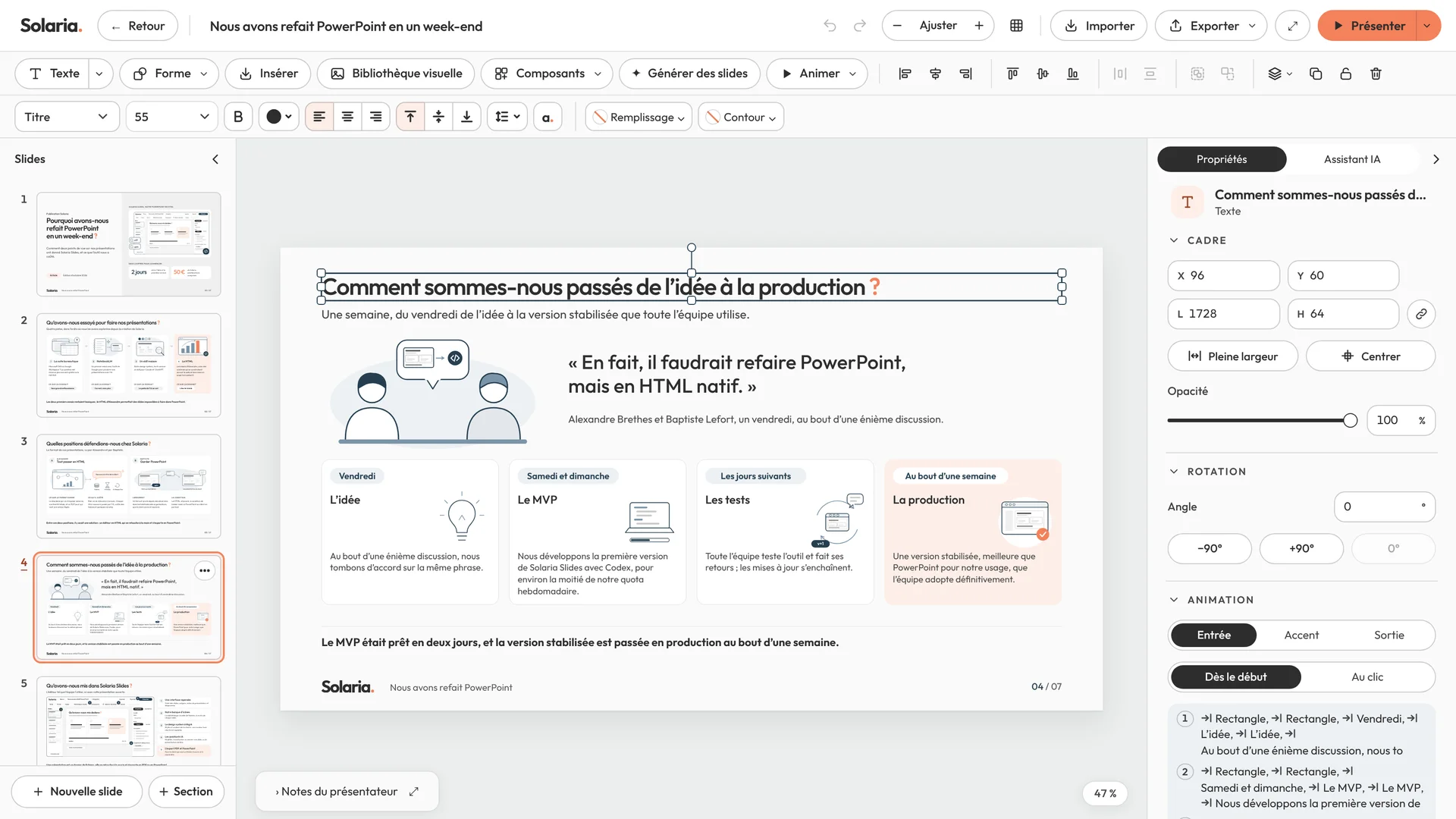
Solaria Slides, with the presentation that accompanies this article.
See an example created with Solaria Slides
We turned the ideas in this article into a presentation with Solaria Slides, then edited the slides ourselves. You can browse the seven slides here and download the PowerPoint to examine the result.
Browse the slides Download the PowerPoint
How do we work with Solaria Slides?
Today, we first prepare the content with AI: the audience, the goal, the ideas, the argument, and the order of the slides. We can take the time to discuss the reasoning and what each page should contribute before turning to its form.
A skill shared across the team then generates the layout in line with our brand guidelines, directly in Solaria Slides. The shared rules are already in place: we do not have to explain our design system again for every new presentation or go through an import step.
Then we take over. We can edit each element or ask AI for a change, which appears directly in the open editor. We choose whichever is most convenient: correcting a few words ourselves, or asking AI to rework an entire slide. And of course, we can always start from a blank page to build the whole presentation ourselves.
A tool the team adopted
My main concern was adoption. An editor built around my habits could be very effective for me without suiting the other two people on the team. There are three of us, which makes it easy to communicate, but does not guarantee that everyone will actually adopt the tool.
During the week of testing, everyone tried the prototype and reported what was missing or getting in the way: a missing feature, an annoying behavior in the editor, or an edit that still required too many steps. That feedback prompted successive updates. Everyone could see their needs being addressed and still had the option to edit their slides by hand.
To ensure adoption, the tool had to be truly better than what was available on the market, and within an hour, they had to say: “OK, this is much better. I’m adopting it.” That is what happened, so mission accomplished!
Building our tools around how we use them
We carried out this experiment with PowerPoint, but also with several other internal tools at Solaria. Creating a custom tool is becoming faster and less expensive, provided you know what you are doing.
The first versions need adjustments, but through iteration, we get tools that truly meet our needs.
We then need to put governance and long-term maintenance in place for these tools. At Solaria, that is part of what we do. Other companies will need to plan for this framework as teams become able to create their own tools.
What software would you like to be able to adapt to the way you work?
 Alexandre Brethes


 Baptiste Lefort